找到
5
篇与
技术教程
相关的结果
-
 【油猴脚本】百度搜索广告净化器-移除百度搜索结果中的各类广告 🧹 百度搜索深度净化器 你是否受够了百度搜索满屏的广告、无关的热榜和繁杂的推荐?这款脚本专为百度搜索打造,帮你剥离冗余信息,只留纯粹搜索结果。 🛡️ 核心功能: 强力去广告:精准识别并移除顶部图文推广、底部蓝字广告及右侧底部推广位。 右侧栏瘦身:可一键隐藏右侧的“百度热榜”、“相关搜索”及“百度保障护航”提示。 清理底部干扰:彻底告别搜索结果底部的“大家还在搜/都在搜”及“相关搜索”表格。 内容来源过滤:支持屏蔽指定来源内容(如一键屏蔽 baijiahao.baidu.com 百家号文章)。 ⚙️ 特色亮点: 模块化可控:不做一刀切!所有 8 项净化规则均为独立开关,你可以自由决定开启或关闭哪些功能。 原生设置面板:告别丑陋的悬浮球,设置页完美融入油猴菜单。点击浏览器油猴图标 -> 选择“🧹 净化器设置”,即可唤出美观的原生风格配置面板。 动态防抖监听:采用 MutationObserver + 防抖技术,无论是首页加载还是向下滚动异步加载的新内容,都能瞬间净化,不漏过任何一条广告。 配置持久化:你的所有设置均保存在本地,关闭浏览器也不丢失,一次配置,长久清爽。 脚本截图 mov45dko.png图片 mov4536g.png图片 脚本代码 // ==UserScript== // @name 百度搜索深度净化器 // @namespace http://tampermonkey.net/ // @version 3.1 // @description 智能移除百度搜索结果中的各类广告、相关搜索、热榜、百家号等,通过油猴菜单打开设置 // @author MRBANK // @match *://www.baidu.com/* // @icon https://www.baidu.com/favicon.ico // @grant GM_registerMenuCommand // @run-at document-idle // ==/UserScript== (function() { 'use strict'; // ================= 配置管理 ================= const CONFIG_KEY = 'baidu_purifier_config'; const defaultConfig = { ad: true, // 1. 各类广告 rightRelated: true, // 2. 右侧相关搜索 rightHot: true, // 3. 右侧百度热榜 rightHint: true, // 4. 右侧百度保障提示 rightBottomAd: true, // 5. 右侧底部推广 searchAlso: true, // 6. 大家还在搜/都在搜 bottomRelated: true, // 7. 底部相关搜索 baijiahao: true // 8. 屏蔽百家号 }; // 配置项分组与标签定义 const configStructure = [ { groupName: "广告与推广", items: [ { key: 'ad', label: '搜索结果广告' }, { key: 'rightBottomAd', label: '右侧底部推广' } ] }, { groupName: "右侧栏模块", items: [ { key: 'rightRelated', label: '右侧相关搜索' }, { key: 'rightHot', label: '右侧百度热榜' }, { key: 'rightHint', label: '右侧保障提示' } ] }, { groupName: "内容过滤", items: [ { key: 'baijiahao', label: '屏蔽百家号来源' } ] }, { groupName: "底部与推荐", items: [ { key: 'searchAlso', label: '大家还在搜/都在搜' }, { key: 'bottomRelated', label: '底部相关搜索' } ] } ]; function getConfig() { let saved = localStorage.getItem(CONFIG_KEY); if (saved) { try { return {...defaultConfig, ...JSON.parse(saved)}; } catch(e) { return {...defaultConfig}; } } return {...defaultConfig}; } function saveConfig(cfg) { localStorage.setItem(CONFIG_KEY, JSON.stringify(cfg)); } // ================= 油猴菜单与设置 UI ================= let isPanelOpen = false; let needReload = false; function openSettingsPanel() { if (isPanelOpen) return; isPanelOpen = true; needReload = false; // 注入 CSS const style = document.createElement('style'); style.id = 'bp-settings-style'; style.textContent = ` #bp-overlay { position: fixed; top: 0; left: 0; width: 100%; height: 100%; background: rgba(0,0,0,0.4); z-index: 999998; display: flex; align-items: center; justify-content: center; font-family: -apple-system, BlinkMacSystemFont, "Segoe UI", Roboto, "Helvetica Neue", Arial, sans-serif; } #bp-modal { background: #fff; width: 360px; border-radius: 8px; box-shadow: 0 10px 30px rgba(0,0,0,0.15); overflow: hidden; display: flex; flex-direction: column; } #bp-header { display: flex; justify-content: space-between; align-items: center; padding: 15px 20px; border-bottom: 1px solid #e8e8e8; } #bp-header h3 { margin: 0; font-size: 16px; color: #333; } #bp-close-btn { background: none; border: none; font-size: 20px; color: #999; cursor: pointer; line-height: 1; padding: 0; } #bp-close-btn:hover { color: #333; } #bp-body { padding: 10px 0; max-height: 60vh; overflow-y: auto; } .bp-group-title { padding: 10px 20px 5px; margin: 0; font-size: 13px; color: #888; font-weight: 500; } .bp-switch-row { display: flex; justify-content: space-between; align-items: center; padding: 12px 20px; font-size: 14px; color: #333; transition: background 0.2s; } .bp-switch-row:hover { background: #f5f7fa; } .bp-switch { position: relative; display: inline-block; width: 40px; height: 22px; flex-shrink: 0; } .bp-switch input { opacity: 0; width: 0; height: 0; } .bp-slider { position: absolute; cursor: pointer; top: 0; left: 0; right: 0; bottom: 0; background-color: #ccc; transition: .3s; border-radius: 22px; } .bp-slider:before { position: absolute; content: ""; height: 16px; width: 16px; left: 3px; bottom: 3px; background-color: white; transition: .3s; border-radius: 50%; box-shadow: 0 1px 3px rgba(0,0,0,0.1); } .bp-switch input:checked + .bp-slider { background-color: #4e6ef2; } .bp-switch input:checked + .bp-slider:before { transform: translateX(18px); } `; document.head.appendChild(style); // 构建弹窗 DOM const overlay = document.createElement('div'); overlay.id = 'bp-overlay'; const modal = document.createElement('div'); modal.id = 'bp-modal'; // 头部 const header = document.createElement('div'); header.id = 'bp-header'; const title = document.createElement('h3'); title.textContent = '百度净化器 - 设置'; const closeBtn = document.createElement('button'); closeBtn.id = 'bp-close-btn'; closeBtn.textContent = '✕'; header.appendChild(title); header.appendChild(closeBtn); // 主体 const body = document.createElement('div'); body.id = 'bp-body'; const cfg = getConfig(); configStructure.forEach(group => { const groupTitle = document.createElement('div'); groupTitle.className = 'bp-group-title'; groupTitle.textContent = group.groupName; body.appendChild(groupTitle); group.items.forEach(item => { const row = document.createElement('div'); row.className = 'bp-switch-row'; const label = document.createElement('span'); label.textContent = item.label; const switchContainer = document.createElement('label'); switchContainer.className = 'bp-switch'; const input = document.createElement('input'); input.type = 'checkbox'; input.checked = cfg[item.key]; input.dataset.key = item.key; const slider = document.createElement('span'); slider.className = 'bp-slider'; switchContainer.appendChild(input); switchContainer.appendChild(slider); row.appendChild(label); row.appendChild(switchContainer); body.appendChild(row); // 开关事件 input.addEventListener('change', (e) => { const currentCfg = getConfig(); currentCfg[e.target.dataset.key] = e.target.checked; saveConfig(currentCfg); needReload = true; // 标记需要刷新 }); }); }); modal.appendChild(header); modal.appendChild(body); overlay.appendChild(modal); document.body.appendChild(overlay); // 关闭事件 const closePanel = () => { document.body.removeChild(overlay); document.head.removeChild(style); isPanelOpen = false; if (needReload) location.reload(); // 有关闭改动则刷新 }; closeBtn.addEventListener('click', closePanel); overlay.addEventListener('click', (e) => { if (e.target === overlay) closePanel(); }); } // 注册油猴菜单 GM_registerMenuCommand('🧹 净化器设置', openSettingsPanel); // ================= 核心清理逻辑 ================= function clearBaiduCrap() { const cfg = getConfig(); // 1. 移除带有"广告"标签的推广内容 if (cfg.ad) { const adLabels = document.querySelectorAll('.ec-tuiguang, .ecfc-tuiguang, span[data-tuiguang], a.m'); adLabels.forEach(label => { const isAd = label.classList.contains('ec-tuiguang') || label.classList.contains('ecfc-tuiguang') || label.hasAttribute('data-tuiguang') || (label.tagName === 'A' && label.classList.contains('m') && label.textContent.trim() === '广告'); if (isAd) { let adContainer = label.closest('div[data-placeid]') || label.closest('.EC_result') || label.closest('.c-container') || label.closest('.result'); if (adContainer) adContainer.remove(); } }); } // 2. 移除右侧"相关搜索"模块 if (cfg.rightRelated) { document.querySelectorAll('[tpl="recommend_list_san"]').forEach(el => el.remove()); document.querySelectorAll('.recommend-single-list_5TJKn').forEach(el => { let container = el.closest('.result-op') || el.closest('.cr-content'); if (container) container.remove(); }); } // 3. 移除右侧"百度热榜"模块 if (cfg.rightHot) { document.querySelectorAll('[tpl="right_toplist1"]').forEach(el => el.remove()); document.querySelectorAll('.FYB_RD').forEach(el => { let container = el.closest('.result-op') || el.closest('.cr-content'); if (container) container.remove(); }); } // 4. 移除右侧"百度保障为您搜索护航"提示框 if (cfg.rightHint) { document.querySelectorAll('.hint_right_middle, [tpl="app/hint-head-top"]').forEach(el => { const container = el.closest('.hint_right_middle') || el; if (container) container.remove(); }); } // 5. 移除右侧底部"想在此推广您的产品吗"广告位 if (cfg.rightBottomAd) { const rightBottomAd = document.querySelector('#con-right-bottom') || document.querySelector('.ad-widget-header'); if (rightBottomAd) { const container = rightBottomAd.closest('#con-right-bottom') || rightBottomAd.closest('div[id^="m"]') || rightBottomAd; if (container) container.remove(); } } // 6. 移除"大家还在搜" / "大家都在搜"模块 if (cfg.searchAlso) { const searchAlsoNodes = document.evaluate( "//div[contains(text(), '大家还在搜') or contains(text(), '大家都在搜')]", document, null, XPathResult.UNORDERED_NODE_SNAPSHOT_TYPE, null ); for (let i = 0; i < searchAlsoNodes.snapshotLength; i++) { const node = searchAlsoNodes.snapshotItem(i); const container = node.closest('.c-container') || node.closest('.result-op') || node.closest('[class*="rg-upgrade"]'); if (container) container.remove(); } } // 7. 移除底部的"相关搜索"表格模块 if (cfg.bottomRelated) { document.querySelectorAll('table[class*="rs-table"]').forEach(el => { const container = el.closest('.c-container') || el.closest('.result-op') || el.parentElement; if (container) container.remove(); }); const relatedSearchNodes = document.evaluate( "//div[contains(text(), '相关搜索') or contains(text(), '相关推荐')]", document, null, XPathResult.UNORDERED_NODE_SNAPSHOT_TYPE, null ); for (let i = 0; i < relatedSearchNodes.snapshotLength; i++) { const node = relatedSearchNodes.snapshotItem(i); if (node.closest('table[class*="rs-table"]') || node.querySelector('table[class*="rs-table"]')) { const container = node.closest('.c-container') || node.closest('.result-op') || node.parentElement; if (container) container.remove(); } } } // 8. 屏蔽百家号来源的搜索结果 if (cfg.baijiahao) { // 遍历所有可能的搜索结果卡片 document.querySelectorAll('.c-container, .result').forEach(el => { // 检查底部显示的来源网址文本 const showUrl = el.querySelector('.c-showurl'); const isBaijiahaoText = showUrl && showUrl.textContent.includes('baijiahao.baidu.com'); // 检查真实落地页链接 (标题或底部链接的 data-landurl 属性) const isBaijiahaoLandUrl = el.querySelector('a[data-landurl*="baijiahao.baidu.com"]'); // 检查容器的 mu 属性 (部分卡片含有此属性标识来源) const isBaijiahaoMu = el.hasAttribute('mu') && el.getAttribute('mu').includes('baijiahao.baidu.com'); // 满足以上任一条件,即视为百家号内容并移除 if (isBaijiahaoText || isBaijiahaoLandUrl || isBaijiahaoMu) { el.remove(); } }); } } // ================= 启动逻辑 ================= clearBaiduCrap(); let timer = null; const observer = new MutationObserver(() => { if (timer) clearTimeout(timer); timer = setTimeout(clearBaiduCrap, 150); }); const wrapper = document.getElementById('wrapper') || document.body; observer.observe(wrapper, { childList: true, subtree: true }); })();
-
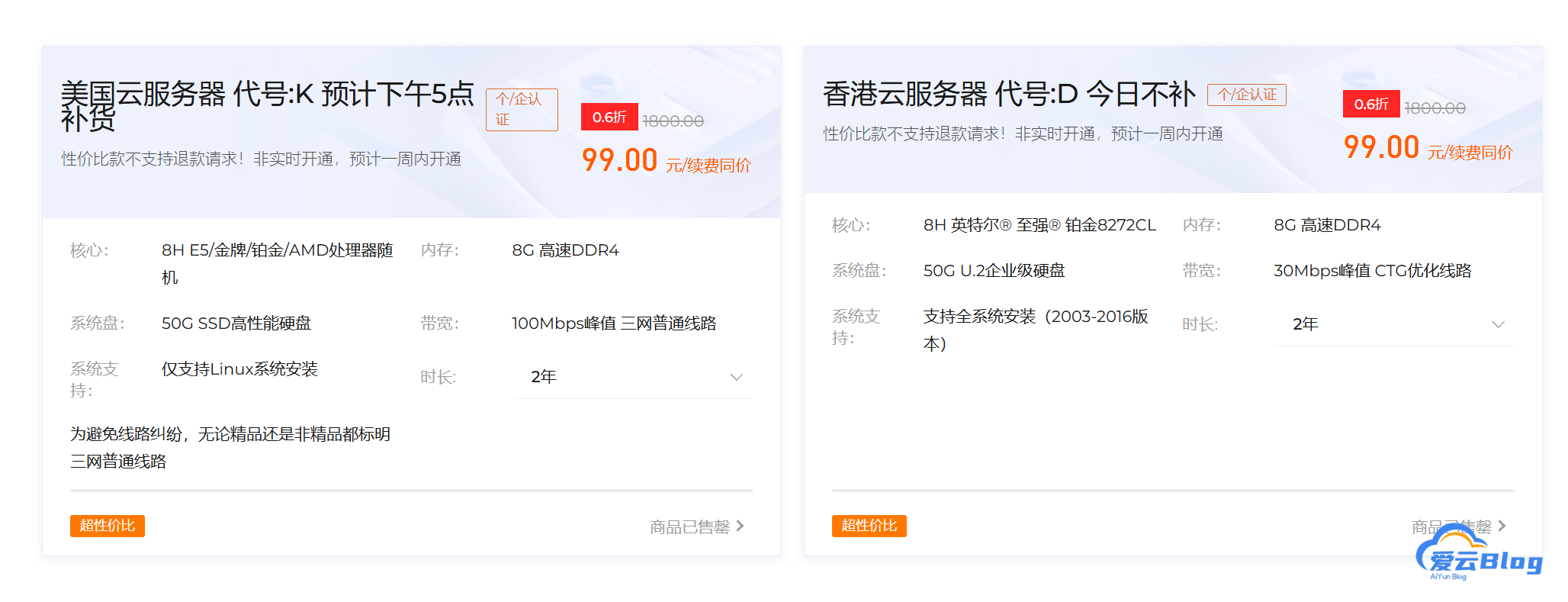
狐帝云灵车服务器评测:99两年美国服务器线路,速度、价格一网打尽 前言 最近在给好兄弟们找好用的服务器,偶然间发现了狐帝云活动是99两年的8h8g美国服务器,抱着试一试的心态买了一台做测试,没想到线路还不错。 先上图 mnikf6zm.png图片 不是一直有货,会通知补货 我这台开到的是官网同款AMD7B12处理器的 CPU 型号 : AMD EPYC 7B12 64-Core Processor CPU 核心数 : 8 CPU 频率 : 2249.998 MHz CPU 缓存 : L1: 0.00 KB / L2: 0.00 KB / L3: 0.00 KB AES-NI指令集 : ✔ Enabled VM-x/AMD-V支持 : ✔ Enabled 内存 : 250.69 MiB / 7.76 GiB Swap : [ no swap partition or swap file detected ] 硬盘空间 : 2.22 GiB / 49.99 GiB 启动盘路径 : /dev/vda1 系统在线时间 : 0 days, 0 hour 6 min 负载 : 0.67, 0.39, 0.15 系统 : CentOS Linux 7 (Core) (x86_64) 架构 : x86_64 (64 Bit) 内核 : 6.1.35 TCP加速方式 : bbr 虚拟化架构 : KVM NAT类型 : Full Cone IPV4 ASN : AS8796 FASTNET DATA INC IPV4 位置 : Los Angeles / California / US ------------------------CPU测试--通过sysbench测试------------------------- -> CPU 测试中 (Fast Mode, 1-Pass @ 5sec) 1 线程测试(单核)得分: 1103 Scores 8 线程测试(多核)得分: 8687 Scores --------------------内存测试--感谢lemonbench开源---------------------------- -> 内存测试 Test (Fast Mode, 1-Pass @ 5sec) 单线程读测试: 26933.16 MB/s 单线程写测试: 12688.60 MB/s --------------------磁盘dd读写测试--感谢lemonbench开源-------------------- -> 磁盘IO测试中 (4K Block/1M Block, Direct Mode) 测试操作 写速度 读速度 100MB-4K Block 50.2 MB/s (12.25 IOPS, 2.09s) 65.0 MB/s (15862 IOPS, 1.61s) 1GB-1M Block 669 MB/s (638 IOPS, 1.57s) 2.6 GB/s (2437 IOPS, 0.41s) ----------------------磁盘fio读写测试--感谢yabs开源----------------------- Block Size | 4k (IOPS) | 64k (IOPS) ------ | --- ---- | ---- ---- Read | 204.25 MB/s (51.0k) | 166.00 MB/s (2.5k) Write | 204.78 MB/s (51.1k) | 166.87 MB/s (2.6k) Total | 409.03 MB/s (102.2k) | 332.88 MB/s (5.2k) | | Block Size | 512k (IOPS) | 1m (IOPS) ------ | --- ---- | ---- ---- Read | 438.76 MB/s (856) | 542.66 MB/s (529) Write | 462.07 MB/s (902) | 578.80 MB/s (565) Total | 900.83 MB/s (1.7k) | 1.12 GB/s (1.0k)网络质量 -------------上游及三网回程--基于oneclickvirt/backtrace开源-------------- 国家: US 城市: Los Angeles 服务商: AS8796 FASTNET DATA INC 北京电信v4 219.141.140.10 电信CN2GIA [精品线路] 北京联通v4 202.106.195.68 联通9929 [优质线路] 北京移动v4 221.179.155.161 移动CMI [普通线路] 移动CMIN2 [精品线路] 上海电信v4 202.96.209.133 电信CN2GIA [精品线路] 上海联通v4 210.22.97.1 联通9929 [优质线路] 联通4837 [普通线路] 上海移动v4 211.136.112.200 移动CMI [普通线路] 移动CMIN2 [精品线路] 广州电信v4 58.60.188.222 电信CN2GIA [精品线路] 广州联通v4 210.21.196.6 联通9929 [优质线路] 广州移动v4 120.196.165.24 移动CMI [普通线路] 移动CMIN2 [精品线路] 成都电信v4 61.139.2.69 电信CN2GIA [精品线路] 成都联通v4 119.6.6.6 检测不到回程路由节点的IPV4地址 成都移动v4 211.137.96.205 移动CMI [普通线路] 移动CMIN2 [精品线路] 准确线路自行查看详细路由,本测试结果仅作参考 同一目标地址多个线路时,检测可能已越过汇聚层,除第一个线路外,后续信息可能无效这真是很大的惊喜,没想到这么便宜竟然还有这么好的线路。然后我跑了下测速。 网速测速 位置 上传速度 下载速度 延迟 Speedtest.net 93.55Mbps 90.39Mbps 46.27ms 日本东京 84.91Mbps 88.08Mbps 101.10ms 联通上海5G 84.84Mbps 71.91Mbps 155.83ms 联通北京 81.75Mbps 69.52Mbps 153.27ms 电信Suzhou5G 85.38Mbps 89.88Mbps 146.13ms 电信Zhenjiang5G 81.42Mbps 90.81Mbps 136.60ms 整体来说还是相当可以的,100m峰值。建站的话非常不错。 高防? mniki85a.png图片 这个不确定,没有测试,不过他们的网站上是这样写的。 不过99两年,能开机就不错了,而且注意活动机是随机开的。并不是所有人都会开到跟我一样的配置。自行测试吧 最后 上链接 https://www.szhdy.com/activities/default.html?method=activity&id=9 线路、速度、价格真的是一网打尽,质量嘛 各位还是自行判断吧,不过还是劝各位做好备份,毕竟数据无价。 最后是完整的缝合怪测试记录 https://paste.spiritlhl.net/#/show/Sap1n.txt
-
宝塔面板 + WebDAV 存储插件:一键备份实战教程 前言 在 Web 站点的日常运维中,数据备份几乎是必不可少的一环。 传统的备份方式往往需要手工操作或依赖第三方脚本。 宝塔面板凭借其一站式管理特性,已成为不少站长的首选。 结合WebDAV存储插件,就能把备份直接上传到 NAS、Nextcloud、OwnCloud 等云存储,省去额外挂载或同步的麻烦。 本文将从零开始,教你: 安装并启用宝塔的 WebDAV 存储插件。 通过宝塔计划任务实现定时执行。 快速恢复数据。 安装与启用 WebDAV 存储插件 登录宝塔面板 → 侧边栏 插件商城。 搜索 WebDAV存储,点击 安装。 安装完成后,点击进入设置 mnfr8daf.png图片 4.在弹窗里填入插件信息: mnfr8xda.png图片 以爱云网盘的webdav为实例 mnfreexh.png图片 mnfrgltc.png图片 mnfrgqrv.png图片 5.这样就算连接成功了 接下来是使用宝塔计划任务实现定时执行 1.添加计划任务 mnfrjygb.png图片 2.选择备份到webdav mnfrktlm.png图片 3.添加好即可 恢复流程 恢复也仅需两步,保持与备份的一致性即可。 1.登录宝塔 → 文件管理 → WebDAV → 找到备份文件 bt_backup_20240601_120000.tar.gz,下载 到本地。 2.解包到目标目录 小结 宝塔 + WebDAV 组合,极大降低备份部署难度,既能远程存储又易于管理。 通过计划任务,实现全自动化备份,确保任何业务中断时都能快速恢复。 只需几行代码,便可把备份流程落地,还能根据业务需求轻松扩展。 最后给大家个福利 爱云网盘注册即送5G备份空间 https://pan.aiyunwl.com/signup